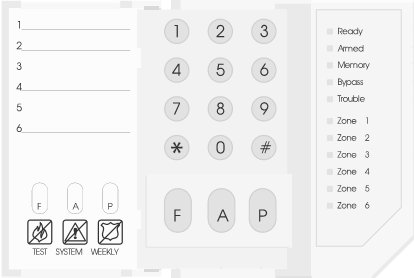
| DSC Keypad |
| Panels:
Older DSC Panels |
| Arm: Enter Code |
| Disarm: Enter Code |
| Check Faulted Zones: Zone light will be lit if faulted. |
| Smoke Detector
Reset: Silence the alarm by pressing [#]. Then press [*][7] to reset smoke detectors. |
| Change code: [*][5]
+ Master Code + user number 01
to 32 + new access code (4 digits). Press the [#] key to exit the Menu. |
| Check Trouble
Condition: Press
[*][2]. Zone lights will indicate type of trouble: 1=low battery, 2=AC
power loss, 3=bell or aux fuse blown, 4=fail to communicate, 5=fire
circuit trouble, 6=loss of time on system clock. |
| Bypass Zone(s):
Enter [*][1] + zone number to be bypassed
(1-digit zone #). |
| Power down
panel: Pull one wire
off battery. Then unplug the panel transformer
if you know where it
is. It is a beige box plugged into a nearby power outlet.
If you can't find it, then disconnect wire on far left
terminal on terminal strip.
(Set up like a Vista panel -- 1st 2 terminals on left are AC power.) |
| User Manual: PC1000, PC1550, PC2550, 4010, 4020, PC5010
(Power 832) |